Experiments
Warning
This contains broad overview of the software pipeline used for various experiments in the lab. Note that this documentation does not dive deep into any one software package, it merely contains recipes for conducting analysis-heavy experiments in MATLAB.
The Virtuous Cycle
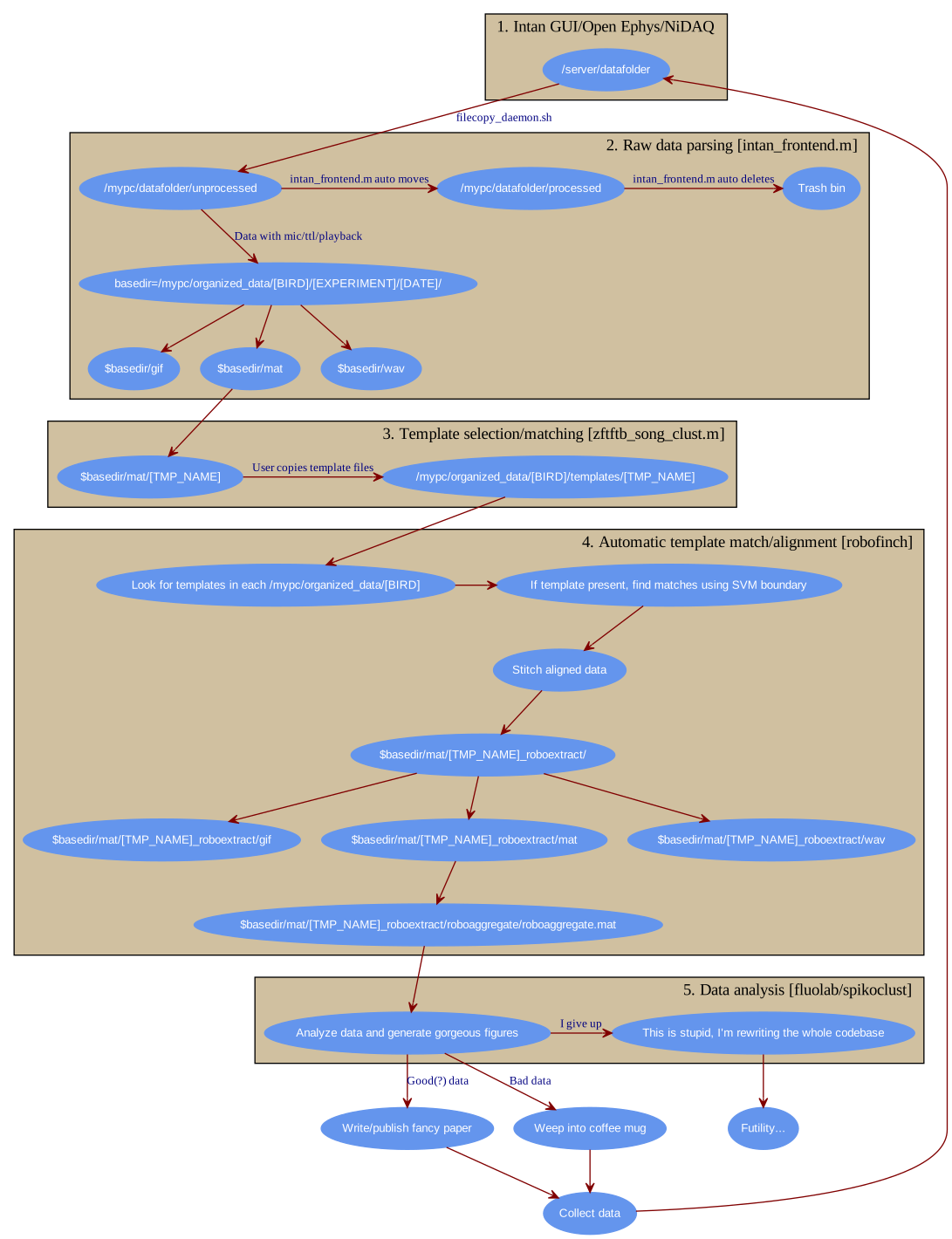
All of the mentioned experiments use a menagerie of MATLAB scripts (organized as sensibly as I could make them). Visualized as a graph, things work as follows.
Electrophysiology in freely behaving songbirds using the Intan system
Both the RHA and RHD versions of the Intan system are supported through various packages. It is assumed that all recordings are performed in freely behaving animals, though various parts of the pipeline work perfectly well with other data types. Here is the broad overview (also see the Virtuous Cycle mentioned above), with the code used for each step.
- Data is acquired on a “front-end” machine using the RHA/RHD evaluation software. This is not resource intensive, most modern Intel machines with 3 GBs of RAM have worked fine. PCs are simplest, but Linux/OS X will work just fine if you’re willing to compile the Intan software.
- Raw data files are then transfered to a “back-end” machine where all offline analysis is performed using a simple bash script.
- Once the files are transfered, processing begins with song detection. Files are processed for song and the resulting data is organizing using the intan_frontend.
- The user then selects a template from the song extractions. Alignments to the template are performed using zftftb. First, the user performs a manual cluster cut in typically 1 day’s worth of singing. This trains a support vector machine (SVM, quadratic kernel) to recognize other examples of the template without user intervention.
- Alignments and extractions of the rest of the data are now automated with the robofinch framework. Examples of the template are aligned for every day’s worth of data.
- Spike sorting is performed on aligned data using spikoclust.
The front-end
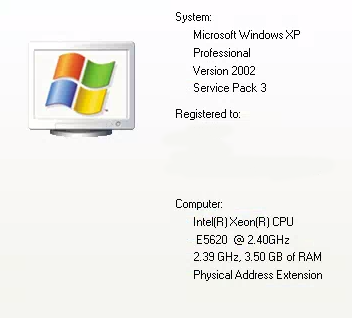
You won’t need anything fancy for your front-end machine. Shown above are the specs for my “workhorse” acquisition machine. It’s powerful enough to keep up with most acquisition equipment, that’s about it.
Warning
The software used to parse the raw data, intan_frontend reads metadata in the filename itself. This was done for maximum compatability. If you want to use this software pipeline obey the README of intan_frontend.
- You can use either the Open Ephys GUI or the Intan Demo software . Both should be fine, though I mostly used the Intan software (YMMV).
- Ephys is pretty straight-forward these days, plug everything in and start streaming some data.
- If you want to use the intan_frontend library, make sure to obey the filename conventions (detailed very explicitly in the repository’s documentation). For example, if you are recording from two birds on port A and port B using the Intan RHD evaluation board, you might use the following base filename
rm7_HVC_mic0adc_portA&lhp33_HVC_mic1adc_portB. This indicates that bird rm7 is on portA, the microphone can be found on adc channel 0, lhp33 is on port B and his mic is being routed to adc 1. The software will append date and timestamps, which are automatically parsed by intan_frontend.
Warning
If you routing a line-level microphone signal to an ADC on the RHD evaluation board, you must ensure the voltages are within an acceptable range, 0-3.3V. There is a board specifically designed for this purpose: intan audio shifter.
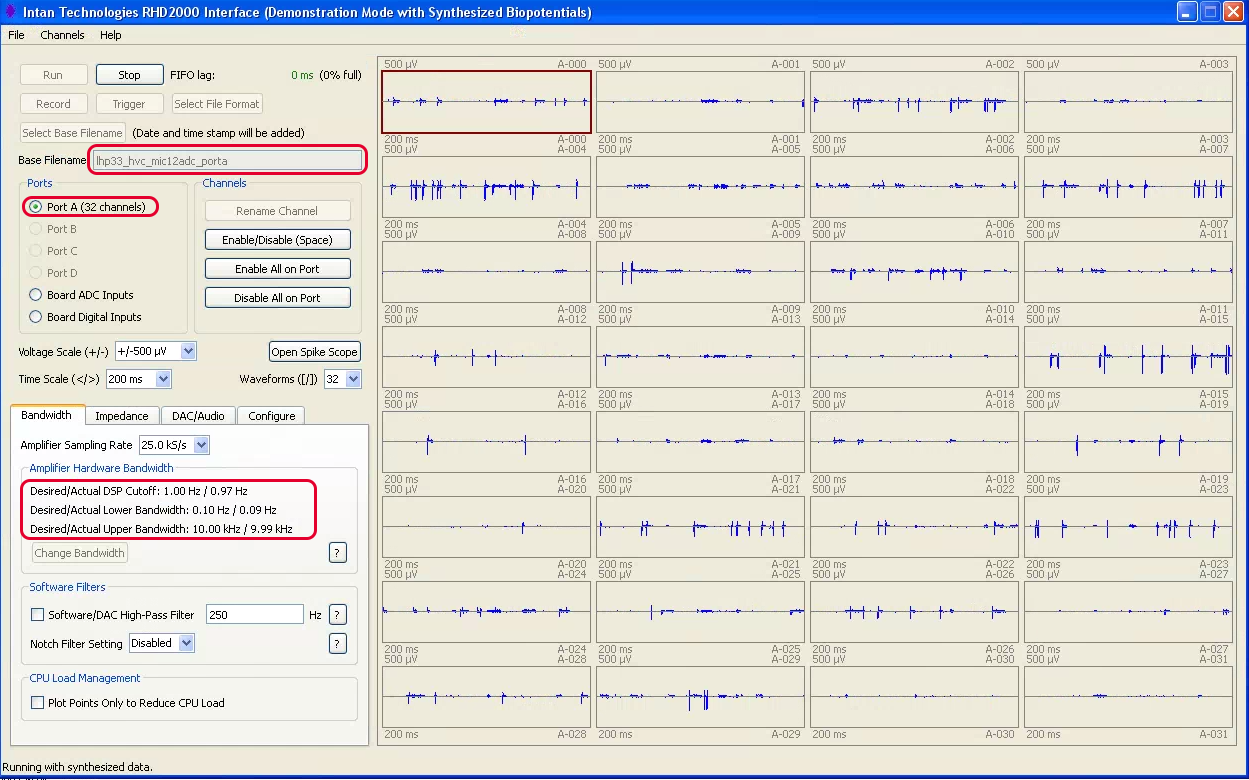
- Above is a screenshot of an Intan RHD recording session using the Intan Demo software. Some key settings are:
- Sampling rate: you should use at least 25 kHz here, especially if you are recording audio
- Adjust the upper bandwidth to half your sampling rate minus some headroom (e.g. 10 kHz when sampling at 25 kHz should be fine).
- Make sure the lower bandwidth is set to .10 Hz, you can always high-pass your data offline.
- Deactivate any channels you are not using (e.g. if you’re using a 16 channel headstage, you can deactivate all channels used for the 32 channel headstage only).
- Activate any adc channels are you using, e.g. adc-0 if you’re recording the microphone on adc-0.
- Set the filename using the appropriate conventions for intan_frontend.
- Be sure to use the “conventional intan file format”. This is the deafult, but you can check
Select file formatto be sure.
The back-end (getting data)
First, you need to get the data from the acquisition computer to your analysis computer. This is done using a simple bash script filecopy_deamon.sh. This assumes you’re on a Mac or Linux machine for the offline analysis, or you’re using a Bash emulator in Windows.
In the bash terminal you will need to set your
~/.bash_profile(see the repository documentation). This can be done easily by issuing:$vim ~/.bash_profile
or if vim isn’t your thing:
$nano ~/.bash_profile
Now you can clone the data-handling repository and symlink the script to somewhere on your PATH:
$cd ~/
$git clone https://github.com/jmarkow/data-handling
$ln -s data-handling/filecopy_daemon.sh /usr/local/bin
If /usr/local/bin/ doesn’t exist, create the directory and add to your PATH in .bash_profile. Restart the terminal and you should simply be able to run:
$filecopy_daemon.sh
Once files with the appropriate extension are dumped into the DATAH_SRC directory, they will be moved into the DATAH_DEST directory once they haven’t been written to for 5 minutes.
The back-end (intan_frontend.m)
Warning
By default, intan_frontend will move the raw data from DATAH_DEST to /DATAH_DEST/../processed/, a directory that contains already-processed raw data. Additionally, the sorted data is placed into /DATAH_DEST/../../intan_data/. These defaults can be changed by passing parameter/value pairs to the script.
Fire up MATLAB in your terminal:
$matlab -nodisplay
In OS X, if the matlab executable is not in your PATH, be sure to add it first:
ln -s /Applications/MATLAB_R[YOURVERSION].app/bin/matlab /usr/local/bin
Restart the terminal and try issuing the first command again. If you’re using Linux, you should be savvy enough to adjust the commands to work for your environment.
Navigate to DATAH_DEST, if you set it to /Volumes/MYHD/data/unprocessed:
>>cd /Volumes/MYHD/data/unprocessed
>>intan_frontend;
This starts the file parser with the default settings, which should be fine. Check out the documentation for a list of all options.
If you want to stop the parser at any point press
ctrl-c, don’t worry this won’t hurt anything.
The back-end (template selection/matching, zftftb)
Data is pouring into /DATAH_DEST/../../intan_data/. You’ll notice that files are organized as follows:
intan_data/[BIRD]/[EXPERIMENT]/[DATE]/[gif|mat|wav]
The
gifdirectory contains spectrograms of the microphone trace,matcontains all of the data aligned to the mic trace, andwavcontains .wav files with the audio only.gifandwavare mostly sanity checks,matis where most of the action happens. Open up MATLAB and navigate to the mat directory:>>cd intan_data/[BIRD][EXPERIMENT]/[DATE]/[mat]
Now you’ll select a template and sounds that match it. For details see here. If you want to use your selection for automatic clustering later, be sure to set the
train_classifierparameter to1ortrue. If you’re unsure of how theaudio_loadparameter works, be sure to read over this section of the zftftb documentation. Now:>>zftftb_song_clust(pwd,'audio_load',my_audio_fun,'train_classifier',1);
This command will let you select a template, cluster the data, and train a classifier for automatic template matching.
The back-end (automating alignments, robofinch)
The robofinch library manages automation. This can be used to automatically extract matches to a template and automatically run scripts and generate figures on aligned data.
The back-end (spike sorting, making figures)
You have arrived at the end of the pipeline. Data has been processed and aligned, now what do you do with it?
Fiber photometry in freely behaving songbirds
This is frighteningly familiar to ephys, so here I’m only going to detail the steps that are different. Firstly, data for photometry is typically acquired through a National Instruments board, I have been using the PCIE-6323 board with a BNC breakout, BNC 2090A. MATLAB can control acquisition with National Instruments equipment through the nyedack library.